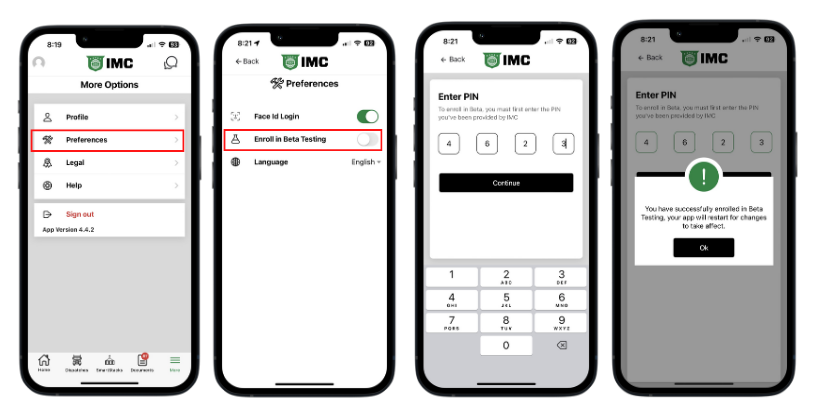
New features are typically released to Beta Testing before rolled out to the entire fleet. If you would like to have the chance to try out these new features and provide feedback, it's simple to enroll using the steps below:
Step 1: Log into Power Direct
Step 2: Tap on "More" in the bottom right corner
Step 3: Select Preferences
Step 4: Turn on Enroll in Beta Testing
Step 5: The enrollment PIN is 4-6-2-3
After enrolling, the app will automatically restart and the changes will take effect once you log back in. You will be enrolled in Beta on ALL of your devices.
NOTE: To unenroll from the Beta Test, simply turn it off in the same place you turned it on.
Once you are enrolled in Beta, you'll begin to get messages whenever there is a new feature to try out. While using this feature, if you have any feedback - you can share that feedback directly with the app development team using the Help icon at the top of the screen.
Report a Bug
How to report a bug in Power Direct