If a customer location has been set up in GeoFence, Power Direct detects when a driver arrives and departs that location. When the app detects that this arrival or departure event has occurred, it will display on the screen. (Example below)

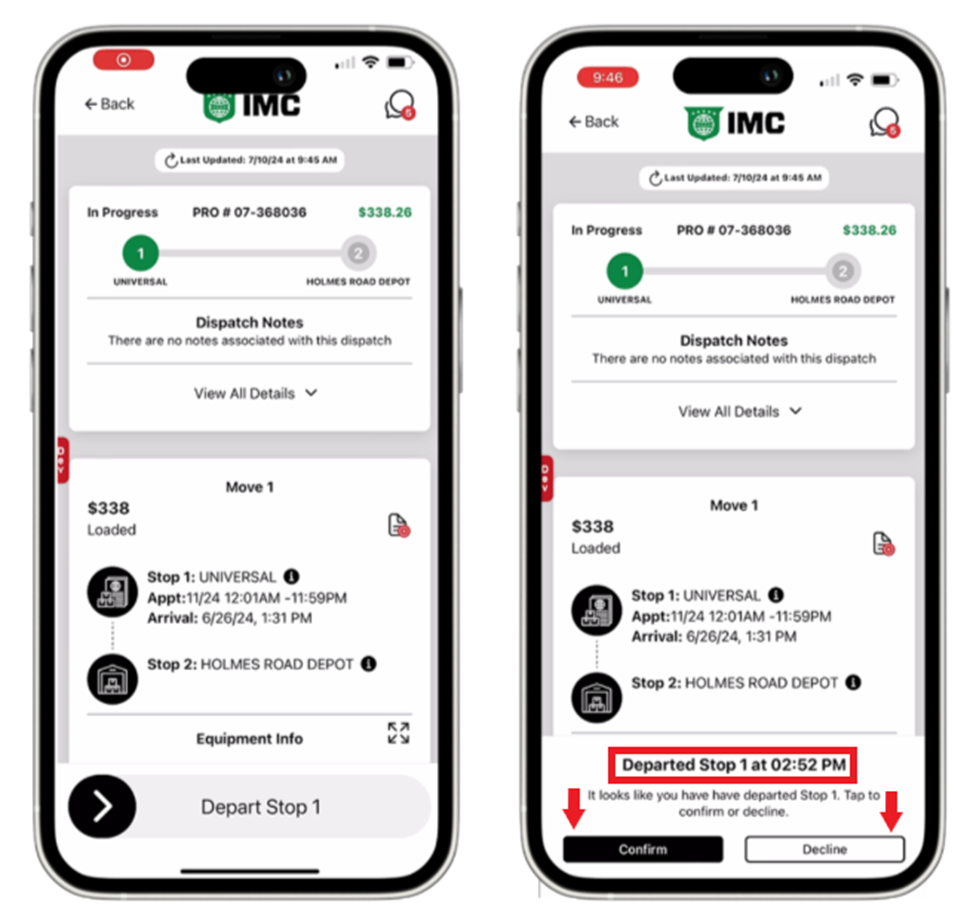
Drivers should tap the “Confirm” button to accept the event & time displayed if it is correct. If incorrect, the driver should tap the “Decline” button and swipe arrive or depart as normal.
Drivers will maintain the ability to manually swipe arrive/depart if the GeoFence does not automatically detect the arrival/departure event & time.
If the driver forgets to tap the “Confirm” button at the time the GeoFence arrival/departure event displays/occurs, that time remains the same until Confirmed or Declined. Tapping the “Confirmed” button later will report the time that the GeoFence breach was detected, not the same the driver tapped confirm.
If drivers have not completed an item on their Stop Checklist, an error message will appear and the Confirm and Decline buttons will be disabled. The driver can still scroll the Dispatch Details screen to resolve those items and then the buttons will be enabled.