Each month, Independent Contractors will need to submit their MMR from the Power Direct App. Upon submission, the report will be emailed to Operations AND the driver for their records.
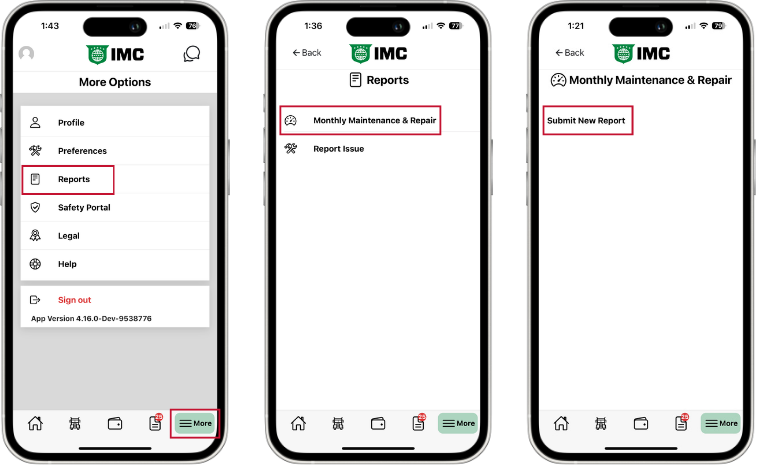
Tap “More” on the lower navigation bar & select “Reports.”
Select “Monthly Maintenance & Repair” & then “Submit New Report.”
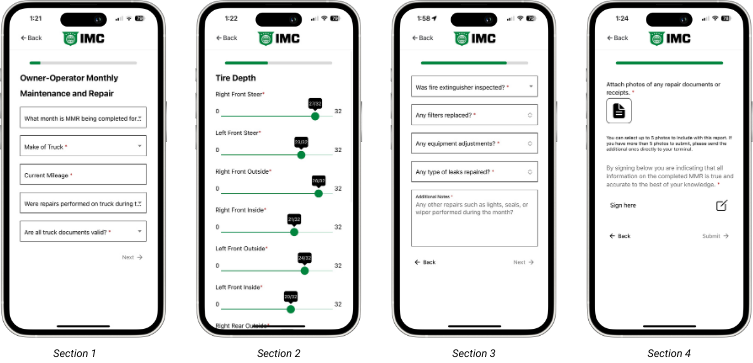
The form is broken into sections to make it easier to complete.
Section 1
The first section asks about the month the MMR is being submitted for as well as the make and mileage of the truck, if repairs were performed, & if ALL truck documents are valid.
Section 2
The second section is specific to tires. It allows the driver to slide the slider to indicate the correct tread depth. There are haptics that allow the driver to feel clicks as they scroll.
“Additional Notes” field
Section 3
The third section asks about inspections, repairs, & adjustments made during the month. If nothing was replace, adjusted, or repaired, the driver must select “None” as an option for each question.
Section 4
The final section allows drivers to upload documents & sign their MMR before submitting. In Section 1 if the driver indicated that repairs were performed, they will be required to upload supporting documents. Otherwise, this is optional. Limited to 5 documents.
ALL questions must be completed in order to proceed to the next page. If there are no additional notes to add, please type “N/A” or “None”
NOTE: Previously submitted MM&R reports can be viewed once that Report option has been selected.
/