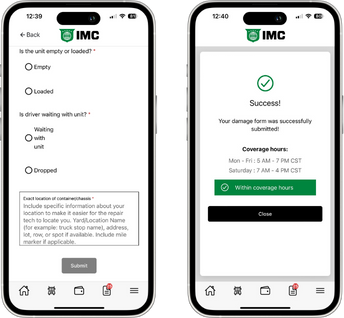
There are 2 ways to report damaged equipment to IMC
If you have a dispatch with damaged equipment, you can tap the "Dispatch Options" button on the details screen and select "Report Damage."
Completing the Damage Form via Dispatch Details will automatically provide Driver Services with the PRO & equipment information when the report is submitted.
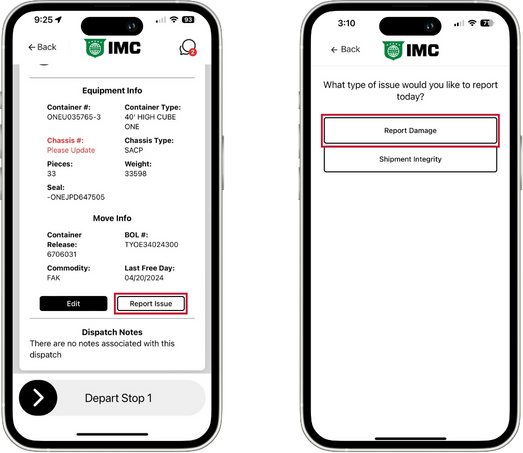
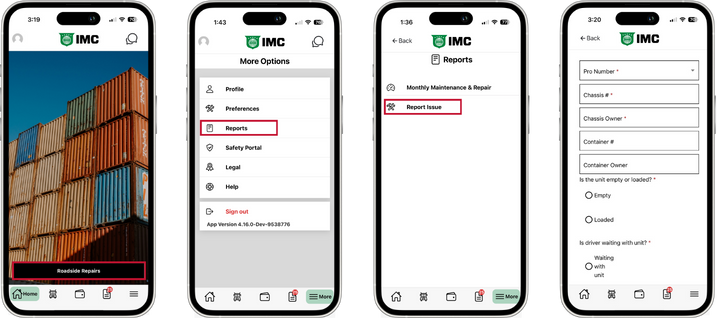
If you do not have an active dispatch for the damaged equipment, you can:
IMC Drivers: select Roadside Repairs from the Home Screen
Vendor Drivers: select "Reports" on the More Options screen
This option will require the driver to choose a PRO from a list or manually type it as well as equipment information.
NOTE: this is perfect for when you received damaged equipment from a SmartStack & haven't entered the information in the app yet or noticed damaged equipment on the yard.
This form allows you to report damage to the chassis or container as well as report expired inspections:
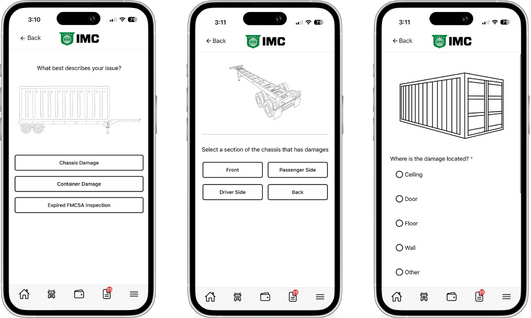
Choose equipment type (chassis, container, inspection)
Choose the location of the issue
Select the piece of equipment with issues/damage
Complete the necessary questions and photos (if applicable)
NOTE: if a question is required, it must be completed before proceeding to the next screen. "Additional Notes" is typically a required field. If you do not have anything to add, type "N/A" in the field to proceed.
You can report up to 20 issues on a single report, just tap "Add More"
Once all of the issues have been added, tap "Finish Inspection"
On the final screen, you will need to answer some additional questions to help the repair tech
Answer all of the questions on this screen as completely as possible
If waiting with the equipment, include your Truck #
Be specific about where you are located so the tech can locate you
Tap "Submit" to send your report to Roadside Repairs
NOTE: You will see a success screen once the form has been submitted.